The Elastic Agent Builder runtime connects LAP to an existing Elastic Agent Builder agent. LAP stores a local agent record, binds it to an Elastic agent ID, and sends prompts through the Kibana Agent Builder API.

How it works

Unlike the Docker Compose runtimes (opencode, deepagents, hermes), the Elastic runtime does not start local containers. It:
  • Uses the built-in elastic_agent_builder runtime
  • Requires an existing Elastic Agent Builder agent ID
  • Sends turns to Elastic’s /api/agent_builder/converse/async endpoint
  • Can optionally target an Elastic space or connector

Prerequisites

  • LiteLLM Agent Platform running
  • Elastic API key
  • Kibana base URL
  • Existing Elastic Agent Builder agent ID

1. Add Elastic runtime credentials

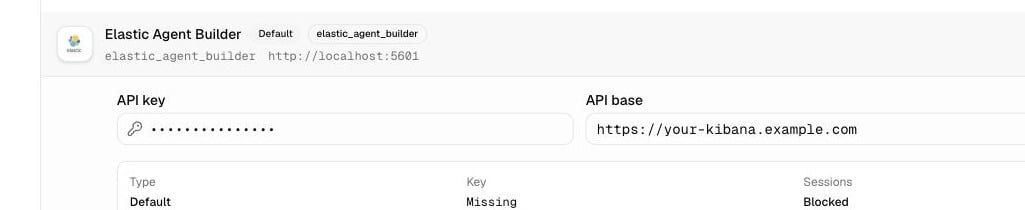
Open Agent Runtimes, expand Elastic Agent Builder, paste your Elastic API key and Kibana base URL, then click Connect. Elastic Agent Builder runtime credential form Or via the API:
curl -X PUT $LAP_URL/api/agent-runtimes/elastic_agent_builder/credentials \
  -H "Authorization: Bearer $MASTER_KEY" \
  -H "Content-Type: application/json" \
  -d '{
    "api_key": "<your-elastic-api-key>",
    "api_base": "https://your-kibana.example.com"
  }'

2. Create an agent

In the UI, create a new agent and choose the Elastic Agent Builder runtime once the runtime credentials are connected. The current UI handles the LAP agent fields. The Elastic-specific binding still lives in the agent config, so use the API when you need to bind an existing Elastic Agent Builder agent ID:
curl -X POST $LAP_URL/api/agents \
  -H "Authorization: Bearer $MASTER_KEY" \
  -H "Content-Type: application/json" \
  -d '{
    "name": "my-elastic-agent",
    "owner_id": "local-user",
    "runtime": "elastic_agent_builder",
    "model": "claude-opus-4-5",
    "system": "You are a helpful assistant.",
    "config": {
      "elastic_agent_id": "<elastic-agent-builder-agent-id>",
      "elastic_space_id": "default"
    }
  }'

3. Start a session

SESSION=$(curl -s -X POST $LAP_URL/session \
  -H "Authorization: Bearer $MASTER_KEY" \
  -H "Content-Type: application/json" \
  -d '{
    "runtime": "elastic_agent_builder",
    "agent_id": "<agent-id>",
    "prompt": "Analyze the error logs and suggest fixes."
  }' | jq -r .id)

4. Stream events

curl -N "$LAP_URL/v1/sessions/$SESSION/events/stream" \
  -H "Authorization: Bearer $MASTER_KEY"

Memory across sessions

Store provider-specific binding options in the agent config. You can patch them later:
curl -X PATCH $LAP_URL/api/agents/<agent-id> \
  -H "Authorization: Bearer $MASTER_KEY" \
  -H "Content-Type: application/json" \
  -d '{
    "config": {
      "elastic_agent_id": "<elastic-agent-builder-agent-id>",
      "elastic_space_id": "default",
      "elastic_connector_id": "<optional-connector-id>"
    }
  }'

Comparison: Elastic vs Docker Compose runtimes

ElasticOpenCode / Deep Agents / Hermes
Runtime IDelastic_agent_builderlocal-opencode, local-deepagents, local-hermes
BackendExisting Elastic Agent Builder agentLocal template service
SetupSave Elastic credentials and bind elastic_agent_iddocker compose --profile <name> up
Best forExisting Elastic Agent Builder workflowsLocal dev, demos